记录一次博客主题的精细化调整 - 2026 年 1 月 23 日的技术
既然说到了技术优化,那就不得不说一下我做啥了。
首先是对 _config.butterfly.yml 的修改,因为我的网站标题都特别长,经常会在导航栏的显示那里出问题,所以我关闭了导航栏标题,现在只显示站点了:
1 | nav: |
我之前的右边侧边栏真的很反人类,我不喜欢,所以我改成了左边:
1 | aside: |
因为我计划是使用自动适配明暗,所以我打开了自动适配:
1 | readmode: true |
我居然没发现我的网站亮色评论区主题写错了:
1 | giscus: |
网站的颜色我不喜欢,不够统一,所以改成和网站背景图统一颜色了:
1 | site_verification: |
大多数人都是亮色,默认明暗已经无所谓了,还不如改成亮色:
1 | preloader: |
第二步是修改 _config.yml,因为我一直没发现我把网站地址写错了:
1 | timezone: Asia/Shanghai |
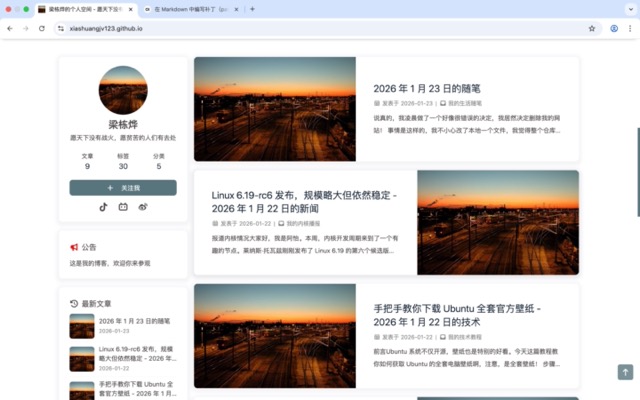
改了那么多,算是更新好了,新网站真好看:
这篇就到这里了。
本博客所有文章除特别声明外,均采用 CC BY-NC-SA 4.0 许可协议。转载请注明来源 梁栋烨的个人空间!
 微信支付
微信支付
相关推荐

2026-01-22
我是如何用 Python 脚本自动抓取友链信息的 - 2026 年 1 月 22 日的技术
前面说到,我写了一个能自动爬取对方网站,生成适合 Hexo 友链配置格式的脚本。 既然说到能添加友链的脚本,那我就来说一下我这个脚本的原理是什么。 为什么我们的浏览器能够精准地渲染一个网站的图标、网站的标题还有网站的个人介绍呢?这是因为实际上他们出现的位置特别地固定! 位置 描述 <title></title> 或 og:title 网站的标题 og:image 或 twitter:image 网站的图标 description 或 og:description 网站的介绍 我们可以根据这些固定的位置,写一个简简单单的脚本,来用正则表达式和爬虫,爬取对应网站的首页,转换成我们需要的配置格式。 1234- name: 网站的标题 link: 网站的链接 avatar: 网站的图标 descr: 网站的介绍 原理是不是听起来很简单?所以说我根据这个,找 AI 生成了一个 Python 脚本: 123456789101112131415161718192021222324252627282930313233343536373839...
2026-01-23
Giscus 官方脚本有中文参数,因此我觉得是 Butterfly 的问题 - 2026 年 1 月 23 日的技术
Giscus 算是个人博客网站最简单的评论插件了,但是 Hexo Butterfly 默认的 Giscus 没有中文评论区,而 Giscus 官方脚本又有这个参数,因此我觉得是 Butterfly 的问题。 在仓库根目录执行 grep -r giscus | grep pug 命令: 我们可以找到一个路径为 ./node_modules/hexo-theme-butterfly/layout/includes/third-party/comments/giscus.pug 的文件;如果你是通过 Git 安装的 Butterfly,应该在 ./themes/butterfly/layout/includes/third-party/comments/giscus.pug 这里。 这个文件里装着 Butterfly 主题的 Giscus 实现方法,修改为下面这样: 12345678910111213141516171819202122232425262728293031323334353637383940414243444546474849505152535455565758596...
2026-01-22
手把手教你下载 Ubuntu 全套官方壁纸 - 2026 年 1 月 22 日的技术
前言Ubuntu 系统不仅开源,壁纸也是特别的好看。今天这篇教程教你如何获取 Ubuntu 的全套电脑壁纸啊,注意,是全套壁纸! 步骤 打开浏览器,输入 USTC 的网址,进入镜像站: 搜索 ubuntu: 点击 ubuntu: 点击 pool: 点击 main: 点击 u: 点击 ubuntu-wallpapers: 下载这个文件(不同版本可能文件名不一样,但是前面的前缀和后面的格式是一样的): 解压文件,将图片移动出来: 1234567mkdir temp ubuntu-wallpapers && \ mv ubuntu-wallpapers_25.10.2_all.orig.tar.gz temp && \ cd temp && \ find -name "*.jpg" -exec mv {} ../ubuntu-wallpapers \; && \ find -name "*.png" -ex...
评论